

NadirClaw — Open-Source LLM Router & AI Cost Optimizer





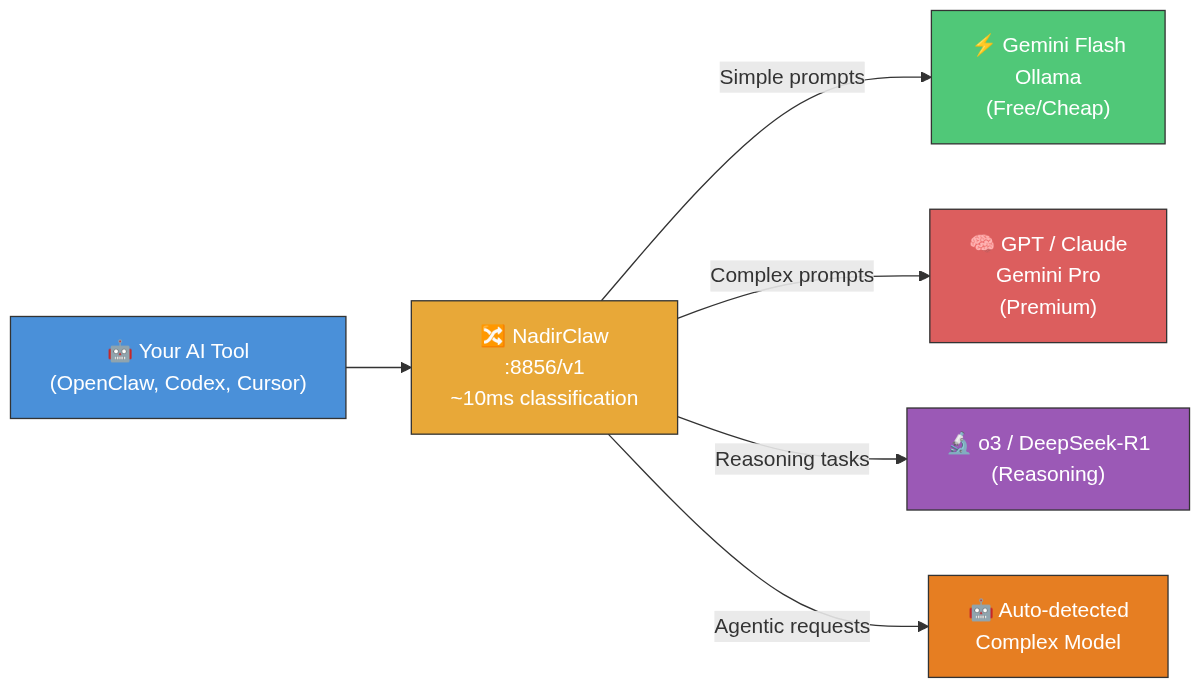
NadirClaw is an open-source LLM router that reduces your AI API costs by 40-70%. It automatically routes simple prompts to cheap or local models and complex prompts to premium models — no code changes required.
NadirClaw runs locally as an OpenAI-compatible proxy and sits between your AI tools and LLM providers. It classifies every prompt in ~10ms using sentence embeddings and routes it to the optimal model. Drop-in compatible with Claude Code, Codex, OpenClaw, Continue, Cursor, or any OpenAI API client.
Why NadirClaw?
Most LLM requests don't need a premium model. In typical coding agent sessions, 60-70% of prompts are simple (reading files, short questions, continuations) and can be handled by models that cost 10-20x less. NadirClaw detects this automatically and routes accordingly — no prompt engineering, no code changes, no third-party service.
Key benefits:
- 💰 Cut AI API costs by 40-70% — real savings from day one
- ⚡ ~10ms classification overhead — you won't notice it
- 🔌 Drop-in proxy — works with any OpenAI-compatible tool
- 🏠 Runs locally — your API keys never leave your machine
- 🔄 Fallback chains — automatic failover when models are down
- 📊 Built-in cost tracking — dashboard, reports, budget alerts
🔒 Your keys. Your models. No middleman. NadirClaw runs locally and routes directly to providers. No third-party proxy, no subsidized tokens, no platform that can pull the plug on you. Why this matters.
Comparisons: NadirClaw vs OpenRouter | NadirClaw vs ClawRouter
CI/CD? Use the NadirClaw GitHub Action to route your CI LLM calls automatically.
Dashboard
Monitor your routing in real-time with nadirclaw dashboard:
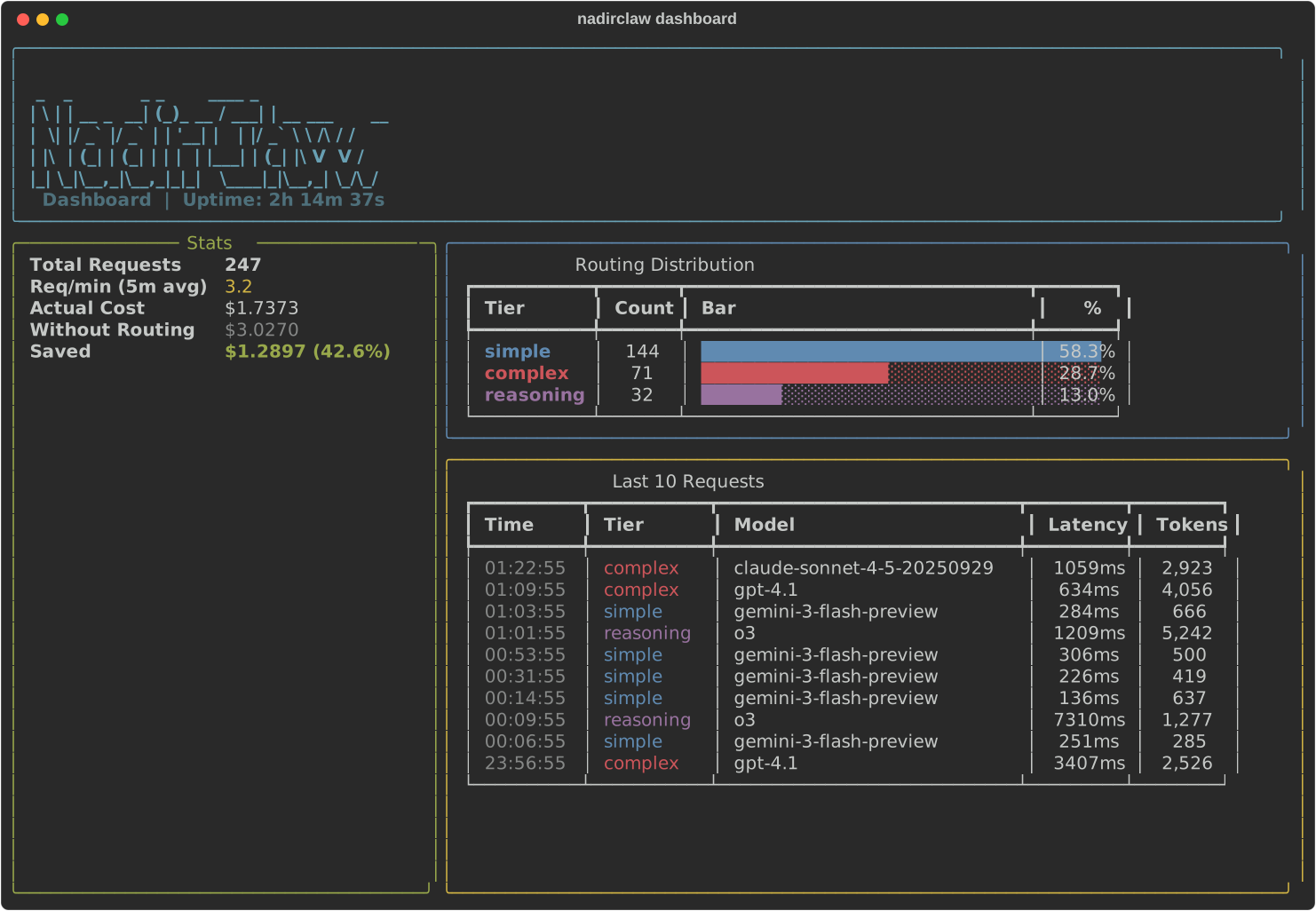
Install the dashboard extras: pip install nadirclaw[dashboard]
Quick Start
pip install nadirclaw
Or install from source:
curl -fsSL https://raw.githubusercontent.com/doramirdor/NadirClaw/main/install.sh | sh
Then run the interactive setup wizard:
nadirclaw setup
This guides you through selecting providers, entering API keys, and choosing models for each routing tier. Then start the router:
nadirclaw serve --verbose
That's it. NadirClaw starts on http://localhost:8856 with sensible defaults (Gemini 3 Flash for simple, OpenAI Codex for complex). If you skip nadirclaw setup, the serve command will offer to run it on first launch.
Features
- Smart routing — classifies prompts in ~10ms using sentence embeddings
- Agentic task detection — auto-detects tool use, multi-step loops, and agent system prompts; forces complex model for agentic requests
- Reasoning detection — identifies prompts needing chain-of-thought and routes to reasoning-optimized models
- Routing profiles —
auto,eco,premium,free,reasoning— choose your cost/quality strategy per request - Model aliases — use short names like
sonnet,flash,gpt4instead of full model IDs - Session persistence — pins the model for multi-turn conversations so you don't bounce between models mid-thread
- Context-window filtering — auto-swaps to a model with a larger context window when your conversation is too long
- Fallback chains — if a model fails (429, 5xx, timeout), NadirClaw cascades through a configurable chain of fallback models until one succeeds
- Streaming support — full SSE streaming compatible with OpenClaw, Codex, and other streaming clients
- Native Gemini support — calls Gemini models directly via the Google GenAI SDK (not through LiteLLM)
- OAuth login — use your subscription with
nadirclaw auth <provider> login(OpenAI, Anthropic, Google), no API key needed - Multi-provider — supports Gemini, OpenAI, Anthropic, Ollama, and any LiteLLM-supported provider
- OpenAI-compatible API — drop-in replacement for any tool that speaks the OpenAI chat completions API
- Request reporting —
nadirclaw reportanalyzes your JSONL logs with filters, latency stats, tier breakdown, and token usage - Raw logging — optional
--log-rawflag to capture full request/response content for debugging and replay - OpenTelemetry tracing — optional distributed tracing with GenAI semantic conventions (
pip install nadirclaw[telemetry]) - Cost savings calculator —
nadirclaw savingsshows exactly how much money you've saved, with monthly projections - Spend tracking and budgets — real-time per-request cost tracking with daily/monthly budget limits, alerts via
nadirclaw budget, optional webhook and stdout notifications - Prompt caching — in-memory LRU cache for identical chat completions, skipping redundant LLM calls entirely. Configurable TTL and max size via
NADIRCLAW_CACHE_TTLandNADIRCLAW_CACHE_MAX_SIZE. Monitor withnadirclaw cacheor the/v1/cacheendpoint - Live dashboard —
nadirclaw dashboardfor terminal, or visithttp://localhost:8856/dashboardfor a web UI with real-time stats, cost tracking, and model usage - GitHub Action —
doramirdor/nadirclaw-actionfor CI/CD pipelines
Prerequisites
- Python 3.10+
- git
- At least one LLM provider:
- Google Gemini API key (free tier: 20 req/day)
- Ollama running locally (free, no API key needed)
- Anthropic API key for Claude models
- OpenAI API key for GPT models
- Provider subscriptions via OAuth (
nadirclaw auth openai login,nadirclaw auth anthropic login,nadirclaw auth antigravity login,nadirclaw auth gemini login) - Or any provider supported by LiteLLM
Install
One-line install (recommended)
curl -fsSL https://raw.githubusercontent.com/doramirdor/NadirClaw/main/install.sh | sh
This clones the repo to ~/.nadirclaw, creates a virtual environment, installs dependencies, and adds nadirclaw to your PATH. Run it again to update.
Manual install
git clone https://github.com/doramirdor/NadirClaw.git
cd NadirClaw
python3 -m venv venv
source venv/bin/activate
pip install -e .
Uninstall
rm -rf ~/.nadirclaw
sudo rm -f /usr/local/bin/nadirclaw
Docker
Run NadirClaw + Ollama with zero cost, fully local:
git clone https://github.com/doramirdor/NadirClaw.git && cd NadirClaw
docker compose up
This starts Ollama and NadirClaw on port 8856. Pull a model once it's running:
docker compose exec ollama ollama pull llama3.1:8b
To use premium models alongside Ollama, create a .env file with your API keys and model config (see .env.example), then restart.
To run NadirClaw standalone (without Ollama):
docker build -t nadirclaw .
docker run -p 8856:8856 --env-file .env nadirclaw
Configure
Environment File
NadirClaw loads configuration from ~/.nadirclaw/.env. Create or edit this file to set API keys and model preferences:
# ~/.nadirclaw/.env

# API keys (set the ones you use)
GEMINI_API_KEY=AIza...
OPENAI_API_KEY=sk-...
ANTHROPIC_API_KEY=sk-ant-...

# Model routing
NADIRCLAW_SIMPLE_MODEL=gemini-3-flash-preview
NADIRCLAW_COMPLEX_MODEL=gemini-2.5-pro

# Server
NADIRCLAW_PORT=8856
If ~/.nadirclaw/.env does not exist, NadirClaw falls back to .env in the current directory.
Authentication
NadirClaw supports multiple ways to provide LLM credentials, checked in this order:
- OpenClaw stored token (
~/.openclaw/agents/main/agent/auth-profiles.json) - NadirClaw stored credential (
~/.nadirclaw/credentials.json) - Environment variable (
GEMINI_API_KEY,ANTHROPIC_API_KEY,OPENAI_API_KEY, etc.)
Using nadirclaw auth (recommended)
# Add a Gemini API key
nadirclaw auth add --provider google --key AIza...

# Add any provider API key
nadirclaw auth add --provider anthropic --key sk-ant-...
nadirclaw auth add --provider openai --key sk-...

# Login with your OpenAI/ChatGPT subscription (OAuth, no API key needed)
nadirclaw auth openai login

# Login with your Anthropic/Claude subscription (OAuth, no API key needed)
nadirclaw auth anthropic login

# Login with Google Gemini (OAuth, opens browser)
nadirclaw auth gemini login

# Login with Google Antigravity (OAuth, opens browser)
nadirclaw auth antigravity login

# Store a Claude subscription token (from 'claude setup-token') - alternative to OAuth
nadirclaw auth setup-token

# Check what's configured
nadirclaw auth status

# Remove a credential
nadirclaw auth remove google
Using environment variables
Set API keys in ~/.nadirclaw/.env:
GEMINI_API_KEY=AIza...          # or GOOGLE_API_KEY
ANTHROPIC_API_KEY=sk-ant-...
OPENAI_API_KEY=sk-...
Model Configuration
Configure which model handles each tier:
NADIRCLAW_SIMPLE_MODEL=gemini-3-flash-preview          # cheap/free model
NADIRCLAW_COMPLEX_MODEL=gemini-2.5-pro                 # premium model
NADIRCLAW_REASONING_MODEL=o3                           # reasoning tasks (optional, defaults to complex)
NADIRCLAW_FREE_MODEL=ollama/llama3.1:8b                # free fallback (optional, defaults to simple)
NADIRCLAW_FALLBACK_CHAIN=gpt-4.1,claude-sonnet-4-5-20250929,gemini-2.5-flash  # cascade order on failure (optional)
Example Setups
| Setup | Simple Model | Complex Model | API Keys Needed |
|---|---|---|---|
| Gemini + Gemini | gemini-2.5-flash | gemini-2.5-pro | GEMINI_API_KEY |
| Gemini + Claude | gemini-2.5-flash | claude-sonnet-4-5-20250929 | GEMINI_API_KEY + ANTHROPIC_API_KEY |
| Claude + Ollama | ollama/llama3.1:8b | claude-sonnet-4-5-20250929 | ANTHROPIC_API_KEY |
| Claude + Claude | claude-haiku-4-5-20251001 | claude-sonnet-4-5-20250929 | ANTHROPIC_API_KEY |
| OpenAI + Ollama | ollama/llama3.1:8b | gpt-4.1 | OPENAI_API_KEY |
| OpenAI + OpenAI | gpt-4.1-mini | gpt-4.1 | OPENAI_API_KEY |
| OpenAI Codex | gemini-2.5-flash | openai-codex/gpt-5.3-codex | GEMINI_API_KEY + OAuth login |
| Fully local | ollama/llama3.1:8b | ollama/qwen3:32b | None |
Gemini models are called natively via the Google GenAI SDK. All other models go through LiteLLM, which supports 100+ providers.
Usage with Gemini
Gemini is the default simple model. NadirClaw calls Gemini natively via the Google GenAI SDK for best performance.
# Set your Gemini API key
nadirclaw auth add --provider google --key AIza...

# Or set in ~/.nadirclaw/.env
echo "GEMINI_API_KEY=AIza..." >> ~/.nadirclaw/.env

# Start the router
nadirclaw serve --verbose
Rate Limit Fallback
If the primary model hits a 429 rate limit, NadirClaw automatically retries once, then falls back to the other tier's model. For example, if gemini-3-flash-preview is exhausted, NadirClaw will try gemini-2.5-pro (or whatever your complex model is). If both models are rate-limited, it returns a friendly error message instead of crashing.
Usage with Ollama
If you're running Ollama locally, NadirClaw works out of the box with no API keys:
# Fully local setup -- no API keys, no cost
NADIRCLAW_SIMPLE_MODEL=ollama/llama3.1:8b \
NADIRCLAW_COMPLEX_MODEL=ollama/qwen3:32b \
nadirclaw serve --verbose
Or mix local + cloud:
nadirclaw serve \
  --simple-model ollama/llama3.1:8b \
  --complex-model claude-sonnet-4-20250514 \
  --verbose
Recommended Ollama Models
| Model | Size | Good For |
|---|---|---|
llama3.1:8b | 4.7 GB | Simple tier (fast, good enough) |
qwen3:32b | 19 GB | Complex tier (local, no API cost) |
qwen3-coder | 19 GB | Code-heavy complex tier |
deepseek-r1:14b | 9 GB | Reasoning-heavy complex tier |
Auto-Discovery
NadirClaw can automatically discover Ollama instances on your local network:
# Quick scan (localhost only)
nadirclaw ollama discover

# Network scan (finds instances on your local subnet)
nadirclaw ollama discover --scan-network
The nadirclaw setup wizard offers auto-discovery when you select Ollama as a provider, so you don't need to know the URL beforehand. If Ollama is running on a different machine (like a home server or VM), auto-discovery will find it and configure the OLLAMA_API_BASE automatically.
Manual configuration is still supported via the OLLAMA_API_BASE environment variable:
# Connect to Ollama on a different host
OLLAMA_API_BASE=http://192.168.1.100:11434 nadirclaw serve
Usage with OpenClaw
OpenClaw is a personal AI assistant that bridges messaging services to AI coding agents. NadirClaw integrates as a model provider so OpenClaw's requests are automatically routed to the right model.
Quick Setup
# Auto-configure OpenClaw to use NadirClaw
nadirclaw openclaw onboard

# Start the router
nadirclaw serve
This writes NadirClaw as a provider in ~/.openclaw/openclaw.json with model nadirclaw/auto. If OpenClaw is already running, it will auto-reload the config -- no restart needed.
Configure Only (Without Launching)
nadirclaw openclaw onboard
# Then start NadirClaw separately when ready:
nadirclaw serve
What It Does
nadirclaw openclaw onboard adds this to your OpenClaw config:
{
  "models": {
    "providers": {
      "nadirclaw": {
        "baseUrl": "http://localhost:8856/v1",
        "apiKey": "local",
        "api": "openai-completions",
        "models": [{ "id": "auto", "name": "auto" }]
      }
    }
  },
  "agents": {
    "defaults": {
      "model": { "primary": "nadirclaw/auto" }
    }
  }
}
NadirClaw supports the SSE streaming format that OpenClaw expects (stream: true), handling multi-modal content and tool definitions in system prompts.
Usage with Codex
Codex is OpenAI's CLI coding agent. NadirClaw integrates as a custom model provider.
# Auto-configure Codex
nadirclaw codex onboard

# Start the router
nadirclaw serve
This writes ~/.codex/config.toml:
model_provider = "nadirclaw"

[model_providers.nadirclaw]
base_url = "http://localhost:8856/v1"
api_key = "local"
OpenAI Subscription (OAuth)
To use your ChatGPT subscription instead of an API key:
# Login with your OpenAI account (opens browser)
nadirclaw auth openai login

# NadirClaw will auto-refresh the token when it expires
This delegates to the Codex CLI for the OAuth flow and stores the credentials in ~/.nadirclaw/credentials.json. Tokens are automatically refreshed when they expire.
Usage with Claude Code
Claude Code is Anthropic's CLI coding agent. NadirClaw works as a drop-in proxy that intercepts Claude Code's API calls and routes simple prompts to cheaper models.
# Point Claude Code at NadirClaw
export ANTHROPIC_BASE_URL=http://localhost:8856/v1
export ANTHROPIC_API_KEY=local

# Start NadirClaw, then use Claude Code normally
nadirclaw serve --verbose
claude
You can also wrap this in a shell alias:
alias claude-routed='ANTHROPIC_BASE_URL=http://localhost:8856/v1 ANTHROPIC_API_KEY=local claude'
Authentication
Use your existing Claude subscription instead of a separate API key:
# Login with your Anthropic account (OAuth, opens browser)
nadirclaw auth anthropic login

# Or store a Claude subscription token directly
nadirclaw auth setup-token
What happens
Claude Code sends every request to Anthropic's API. With NadirClaw in front, each prompt is classified in ~10ms:
- Simple prompts (reading files, quick questions, "what does this function do?") get routed to a cheap model like Gemini Flash
- Complex prompts (refactoring, architecture, multi-file changes) stay on Claude
Streaming works as expected. In typical Claude Code usage, 40-70% of prompts are simple enough to route to a cheaper model, which translates directly to cost savings.
Usage with Any OpenAI-Compatible Tool
NadirClaw exposes a standard OpenAI-compatible API. Point any tool at it:
# Base URL
http://localhost:8856/v1

# Model
model: "auto"    # or omit -- NadirClaw picks the best model
Example: curl
curl http://localhost:8856/v1/chat/completions \
  -H "Content-Type: application/json" \
  -d '{
    "messages": [{"role": "user", "content": "What is 2+2?"}]
  }'
Example: curl (streaming)
curl http://localhost:8856/v1/chat/completions \
  -H "Content-Type: application/json" \
  -d '{
    "messages": [{"role": "user", "content": "What is 2+2?"}],
    "stream": true
  }'
Example: Python (openai SDK)
from openai import OpenAI

client = OpenAI(
    base_url="http://localhost:8856/v1",
    api_key="local",  # NadirClaw doesn't require auth by default
)

response = client.chat.completions.create(
    model="auto",
    messages=[{"role": "user", "content": "What is 2+2?"}],
)
print(response.choices[0].message.content)
Routing Profiles
Choose your routing strategy by setting the model field:
| Profile | Model Field | Strategy | Use Case |
|---|---|---|---|
| auto | auto or omit | Smart routing (default) | Best overall balance |
| eco | eco | Always use simple model | Maximum savings |
| premium | premium | Always use complex model | Best quality |
| free | free | Use free fallback model | Zero cost |
| reasoning | reasoning | Use reasoning model | Chain-of-thought tasks |
# Use profiles via the model field
curl http://localhost:8856/v1/chat/completions \
  -H "Content-Type: application/json" \
  -d '{"model": "eco", "messages": [{"role": "user", "content": "Hello"}]}'

# Also works with nadirclaw/ prefix
# model: "nadirclaw/eco", "nadirclaw/premium", etc.
Model Aliases
Use short names instead of full model IDs:
| Alias | Resolves To |
|---|---|
sonnet | claude-sonnet-4-5-20250929 |
opus | claude-opus-4-6-20250918 |
haiku | claude-haiku-4-5-20251001 |
gpt4 | gpt-4.1 |
gpt5 | gpt-5.2 |
flash | gemini-2.5-flash |
gemini-pro | gemini-2.5-pro |
deepseek | deepseek/deepseek-chat |
deepseek-r1 | deepseek/deepseek-reasoner |
llama | ollama/llama3.1:8b |
# Use an alias as the model
curl http://localhost:8856/v1/chat/completions \
  -H "Content-Type: application/json" \
  -d '{"model": "sonnet", "messages": [{"role": "user", "content": "Hello"}]}'
Routing Intelligence — How NadirClaw Classifies Prompts
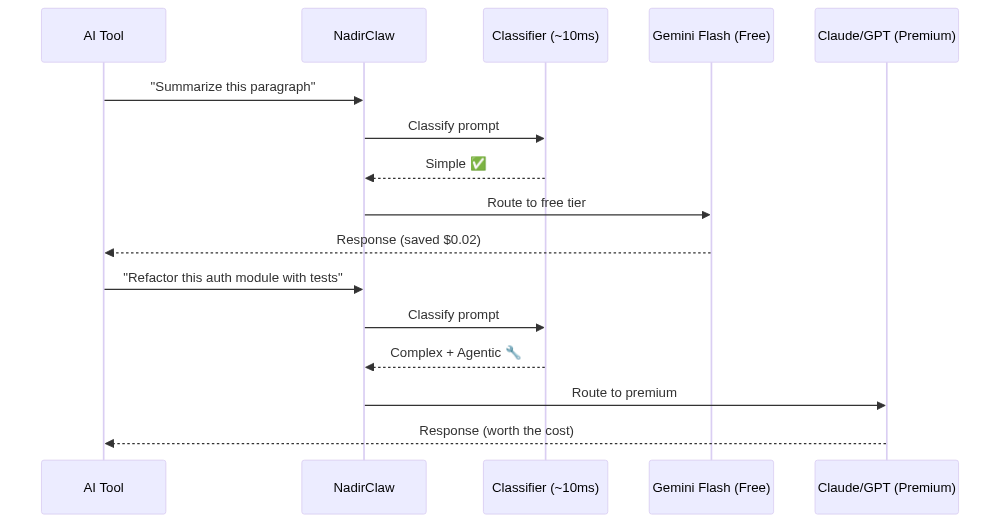
Beyond basic simple/complex classification, NadirClaw applies routing modifiers that can override the base decision:
Agentic Task Detection
NadirClaw detects agentic requests (coding agents, multi-step tool use) and forces them to the complex model, even if the individual message looks simple. Signals:
- Tool definitions in the request (
toolsarray) - Tool-role messages (active tool execution loop)
- Assistant→tool→assistant cycles (multi-step execution)
- Agent-like system prompts ("you are a coding agent", "you can execute commands")
- Long system prompts (>500 chars, typical of agent instructions)
- Deep conversations (>10 messages)
This prevents a message like "now add tests" from being routed to the cheap model when it's part of an ongoing agentic refactoring session.
Reasoning Detection
Prompts with 2+ reasoning markers are routed to the reasoning model (or complex model if no reasoning model is configured):
- "step by step", "think through", "chain of thought"
- "prove that", "derive the", "mathematically show"
- "analyze the tradeoffs", "compare and contrast"
- "critically analyze", "evaluate whether"
Session Persistence
Once a conversation is routed to a model, subsequent messages in the same session reuse that model. This prevents jarring mid-conversation model switches. Sessions are keyed by system prompt + first user message, with a 30-minute TTL.
Context Window Filtering
If the estimated token count of a request exceeds a model's context window, NadirClaw automatically swaps to a model with a larger context. For example, a 150k-token conversation targeting gpt-4o (128k context) will be redirected to gemini-2.5-pro (1M context).
CLI Reference
nadirclaw setup              # Interactive setup wizard (providers, keys, models)
nadirclaw serve              # Start the router server
nadirclaw serve --log-raw    # Start with full request/response logging
nadirclaw classify           # Classify a prompt (no server needed)
nadirclaw report             # Show a summary report of request logs
nadirclaw report --since 24h # Report for the last 24 hours
nadirclaw savings            # Show how much money NadirClaw saved you
nadirclaw savings --since 7d # Savings for the last 7 days
nadirclaw dashboard          # Live terminal dashboard with real-time stats
nadirclaw status             # Show config, credentials, and server status
nadirclaw auth add           # Add an API key for any provider
nadirclaw auth status        # Show configured credentials (masked)
nadirclaw auth remove        # Remove a stored credential
nadirclaw auth setup-token      # Store a Claude subscription token (alternative to OAuth)
nadirclaw auth openai login     # Login with OpenAI subscription (OAuth)
nadirclaw auth openai logout    # Remove stored OpenAI OAuth credential
nadirclaw auth anthropic login     # Login with Anthropic/Claude subscription (OAuth)
nadirclaw auth anthropic logout    # Remove stored Anthropic OAuth credential
nadirclaw auth antigravity login   # Login with Google Antigravity (OAuth, opens browser)
nadirclaw auth antigravity logout  # Remove stored Antigravity OAuth credential
nadirclaw auth gemini login       # Login with Google Gemini (OAuth, opens browser)
nadirclaw auth gemini logout      # Remove stored Gemini OAuth credential
nadirclaw codex onboard         # Configure Codex integration
nadirclaw openclaw onboard   # Configure OpenClaw integration
nadirclaw build-centroids    # Regenerate centroid vectors from prototypes
nadirclaw serve
nadirclaw serve [OPTIONS]

Options:
  --port INTEGER          Port to listen on (default: 8856)
  --simple-model TEXT     Model for simple prompts
  --complex-model TEXT    Model for complex prompts
  --models TEXT           Comma-separated model list (legacy)
  --token TEXT            Auth token
  --verbose               Enable debug logging
  --log-raw               Log full raw requests and responses to JSONL
nadirclaw report
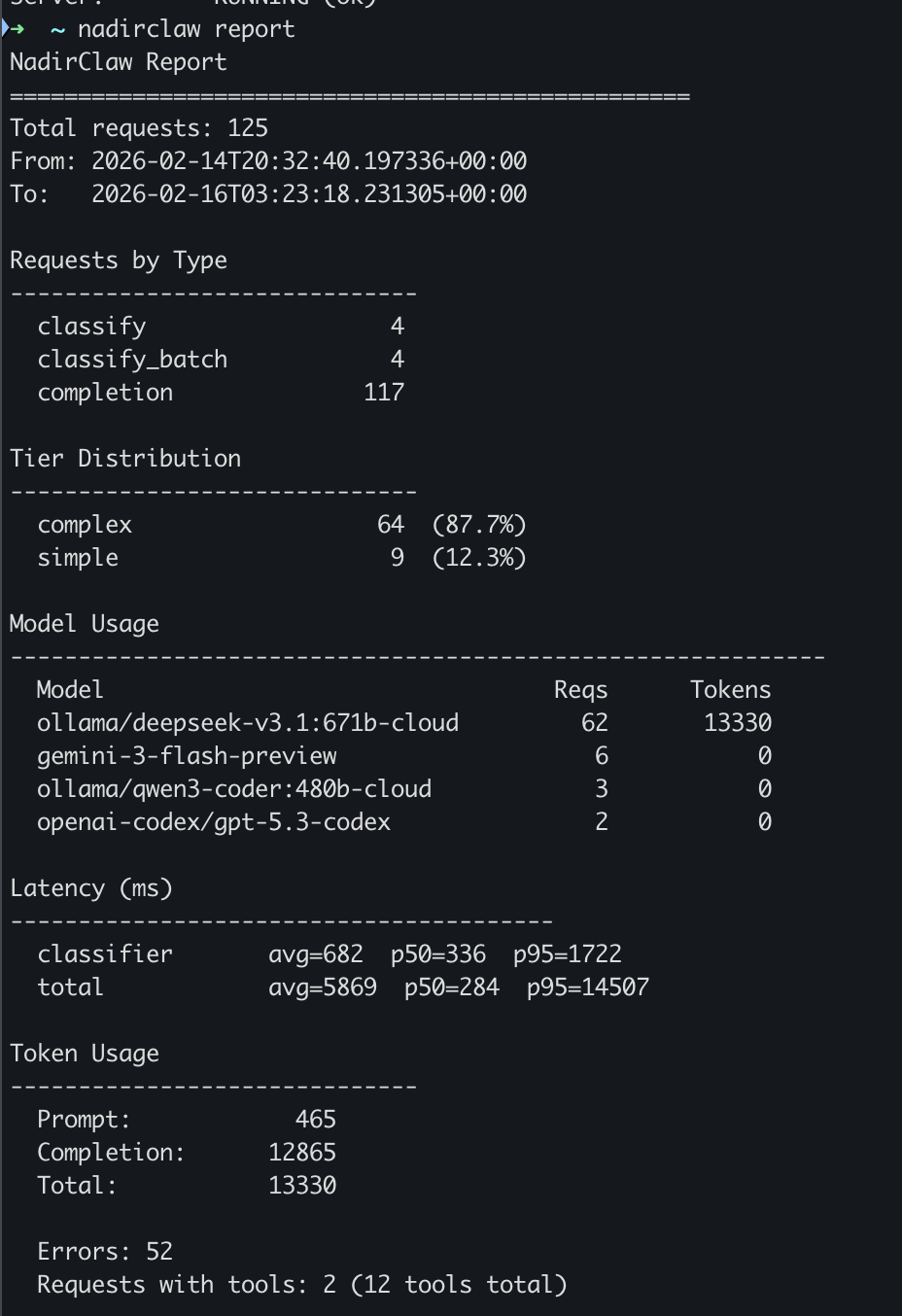
Analyze request logs and print a summary report:
nadirclaw report                     # full report
nadirclaw report --since 24h         # last 24 hours
nadirclaw report --since 7d          # last 7 days
nadirclaw report --since 2025-02-01  # since a specific date
nadirclaw report --model gemini      # filter by model name
nadirclaw report --format json       # machine-readable JSON output
nadirclaw report --export report.txt # save to file
Example output:
NadirClaw Report
==================================================
Total requests: 147
From: 2026-02-14T08:12:03+00:00
To:   2026-02-14T22:47:19+00:00

Requests by Type
------------------------------
  classify                    12
  completion                 135

Tier Distribution
------------------------------
  complex                    41  (31.1%)
  direct                      8  (6.1%)
  simple                     83  (62.9%)

Model Usage
------------------------------------------------------------
  Model                               Reqs      Tokens
  gemini-3-flash-preview                83       48210
  openai-codex/gpt-5.3-codex           41      127840
  claude-sonnet-4-20250514               8       31500

Latency (ms)
----------------------------------------
  classifier       avg=12  p50=11  p95=24
  total             avg=847  p50=620  p95=2340

Token Usage
------------------------------
  Prompt:         138420
  Completion:      69130
  Total:          207550

  Fallbacks: 3
  Errors: 2
  Streaming requests: 47
  Requests with tools: 18 (54 tools total)
nadirclaw classify
Classify a prompt locally without running the server. Useful for testing your setup:
$ nadirclaw classify "What is 2+2?"
Tier:       simple
Confidence: 0.2848
Score:      0.0000
Model:      gemini-3-flash-preview

$ nadirclaw classify "Design a distributed system for real-time trading"
Tier:       complex
Confidence: 0.1843
Score:      1.0000
Model:      gemini-2.5-pro
nadirclaw status
$ nadirclaw status
NadirClaw Status
----------------------------------------
Simple model:  gemini-3-flash-preview
Complex model: gemini-2.5-pro
Tier config:   explicit (env vars)
Port:          8856
Threshold:     0.06
Log dir:       /Users/you/.nadirclaw/logs
Token:         nadir-***

Server:        RUNNING (ok)
How It Works
NadirClaw sits between your application and the LLM provider as a transparent proxy:
┌─────────────────┐
│  Your App       │
│  (Claude Code,  │
│   Cursor, etc)  │
└────────┬────────┘
         │ OpenAI API request
         ▼
┌─────────────────┐
│  NadirClaw      │
│  Classifier     │
└────────┬────────┘
         │ Route decision (10ms)
         ▼
┌─────────────────┐
│  LLM Provider   │
│  (Claude, GPT,  │
│   Gemini, etc)  │
└─────────────────┘
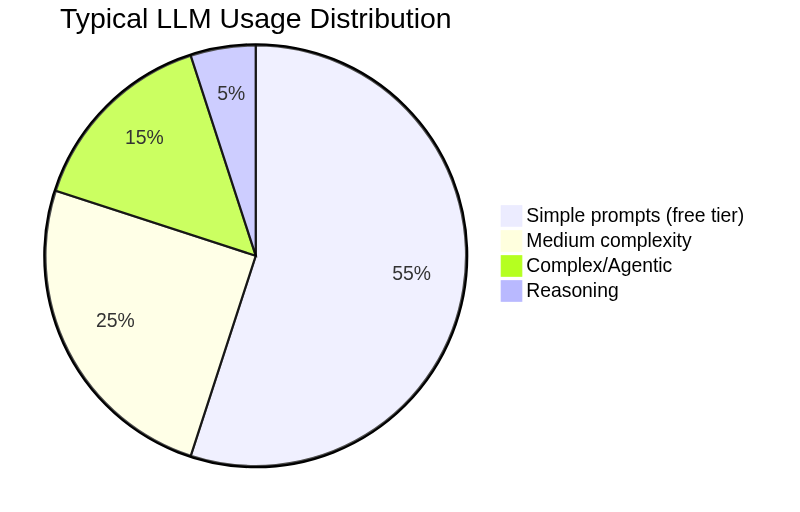
Most LLM usage doesn't need a premium model. NadirClaw routes each prompt to the right tier automatically:
Step-by-Step
-
Your tool sends a request to
localhost:8856/v1/chat/completions(OpenAI format) -
NadirClaw intercepts it and runs the prompt through a lightweight classifier based on sentence embeddings
-
Routes to the cheapest viable model based on the classification result and routing modifiers
-
Forwards the request to the chosen provider and returns the response
-
Logs everything for cost analysis and reporting
Total overhead: ~10ms (classifier inference on a warm encoder)
The Classifier
NadirClaw uses a binary complexity classifier based on sentence embeddings:
-
Pre-computed centroids: Ships two tiny centroid vectors (~1.5 KB each) derived from ~170 seed prompts. These are pre-computed and included in the package — no training step required.
-
Classification: For each incoming prompt, computes its embedding using all-MiniLM-L6-v2 (~80 MB, downloaded once on first use) and measures cosine similarity to both centroids. If the prompt is closer to the complex centroid, it routes to your complex model; otherwise to your simple model.
-
Borderline handling: When confidence is below the threshold (default 0.06), the classifier defaults to complex -- it's cheaper to over-serve a simple prompt than to under-serve a complex one.
-
Routing modifiers: After classification, NadirClaw applies intelligent overrides:
- Agentic detection — if tool definitions, tool-role messages, or agent system prompts are detected, forces the complex model
- Reasoning detection — if 2+ reasoning markers are found, routes to the reasoning model
- Context window check — if the conversation exceeds the model's context window, swaps to a model that fits
- Session persistence — reuses the same model for follow-up messages in the same conversation
-
Dispatch: Calls the selected model via the appropriate backend:
- Gemini models — called natively via the Google GenAI SDK for best performance
- All other models — called via LiteLLM, which provides a unified interface to 100+ providers
-
Fallback chains: If the selected model fails (429 rate limit, 5xx error, or timeout), NadirClaw cascades through a configurable fallback chain. Set
NADIRCLAW_FALLBACK_CHAIN=gpt-4.1,claude-sonnet-4-5-20250929,gemini-2.5-flashto define the order. Default chain uses all your configured tier models.
Why This Works
The key insight: most prompts don't need the most expensive model.
In real-world coding assistant usage:
- 60-70% of prompts work fine on cheap models (Haiku, GPT-4o-mini, Gemini Flash)
- 20-30% need mid-tier (Sonnet, GPT-4o, Gemini Pro)
- 5-10% need flagship (Opus, o1, o3)
But without a classifier, everything hits the expensive default. NadirClaw's job is to route smartly without breaking your workflow.
Classification takes ~10ms on a warm encoder. The first request takes ~2-3 seconds to load the embedding model.
Cost Savings & Benchmarks — How Much Does NadirClaw Save?
Real-world usage shows NadirClaw typically reduces LLM costs by 40-70% depending on your workload and model choices.
Example: Claude Code Usage
A typical 8-hour coding day with Claude Code (tracked via JSONL session logs):
Without NadirClaw:
- Total requests: 147
- All routed to
claude-sonnet-4-5(premium model) - Prompt tokens: 138,420
- Completion tokens: 69,130
- Total cost: $24.18
With NadirClaw:
- Simple tier (62% of requests): 83 requests to
gemini-2.5-flash- Cost: $1.85
- Complex tier (31% of requests): 41 requests to
claude-sonnet-4-5- Cost: $7.32
- Direct (7% of requests): 8 requests (model override, reasoning tasks)
- Cost: $1.12
- Total cost: $10.29
Savings: $13.89 (57% reduction)
Example: OpenClaw Agent
Running an autonomous agent for 24 hours with mixed tasks (file operations, web searches, code generation):
Without routing:
- 412 LLM calls to
gpt-4.1 - Average 850 tokens per call
- Total cost: $31.45
With NadirClaw:
- Simple tier (68%): 280 calls to
ollama/llama3.1:8b(local, free) - Complex tier (32%): 132 calls to
gpt-4.1 - Total cost: $11.92
Savings: $19.53 (62% reduction)
What Gets Routed Where?
Based on 10,000+ production prompts:
Simple tier (typically 60-70% of requests):
- "What does this function do?"
- "Read the file at src/main.py"
- "Add a docstring to this class"
- "Show me the last 5 commits"
- "What's the error on line 42?"
- "Continue with that approach"
Complex tier (30-40% of requests):
- "Refactor this module to use dependency injection"
- "Design a caching layer for this API"
- "Explain the tradeoffs between these architectures"
- "Debug why this async operation deadlocks"
- Multi-file changes requiring context understanding
Auto-upgraded to complex:
- Agentic requests with tool definitions
- Prompts with 2+ reasoning markers
- Long conversations (>10 turns)
- Requests exceeding the simple model's context window
Monthly Projections
If you currently spend $100/month on Claude API:
| Routing Setup | Simple Model | Complex Model | Monthly Cost | Savings |
|---|---|---|---|---|
| No routing | Claude Sonnet | Claude Sonnet | $100.00 | - |
| Conservative | Claude Haiku | Claude Sonnet | $62.00 | 38% |
| Balanced | Gemini Flash | Claude Sonnet | $48.00 | 52% |
| Aggressive | Ollama (free) | Claude Sonnet | $35.00 | 65% |
Use nadirclaw report and nadirclaw savings to see your actual numbers.
API Endpoints
Auth is disabled by default (local-only). Set NADIRCLAW_AUTH_TOKEN to require a bearer token.
| Endpoint | Method | Description |
|---|---|---|
/v1/chat/completions | POST | OpenAI-compatible completions with auto routing (supports stream: true) |
/v1/classify | POST | Classify a prompt without calling an LLM |
/v1/classify/batch | POST | Classify multiple prompts at once |
/v1/models | GET | List available models |
/v1/logs | GET | View recent request logs |
/health | GET | Health check (no auth required) |
Configuration Reference
| Variable | Default | Description |
|---|---|---|
NADIRCLAW_SIMPLE_MODEL | gemini-3-flash-preview | Model for simple prompts |
NADIRCLAW_COMPLEX_MODEL | openai-codex/gpt-5.3-codex | Model for complex prompts |
NADIRCLAW_REASONING_MODEL | (falls back to complex) | Model for reasoning tasks |
NADIRCLAW_FREE_MODEL | (falls back to simple) | Free fallback model |
NADIRCLAW_FALLBACK_CHAIN | (all tier models) | Comma-separated cascade order on model failure |
NADIRCLAW_DAILY_BUDGET | (none) | Daily spend limit in USD (e.g. 5.00) |
NADIRCLAW_MONTHLY_BUDGET | (none) | Monthly spend limit in USD (e.g. 50.00) |
NADIRCLAW_BUDGET_WARN_THRESHOLD | 0.8 | Alert when spend reaches this fraction of budget |
NADIRCLAW_BUDGET_WEBHOOK_URL | (none) | Webhook URL — receives POST with JSON alert payload |
NADIRCLAW_BUDGET_STDOUT_ALERTS | false | Print alerts to stdout (true/1/yes to enable) |
NADIRCLAW_AUTH_TOKEN | (empty — auth disabled) | Set to require a bearer token |
GEMINI_API_KEY | -- | Google Gemini API key (also accepts GOOGLE_API_KEY) |
ANTHROPIC_API_KEY | -- | Anthropic API key |
OPENAI_API_KEY | -- | OpenAI API key |
OLLAMA_API_BASE | http://localhost:11434 | Ollama base URL |
NADIRCLAW_CONFIDENCE_THRESHOLD | 0.06 | Classification threshold (lower = more complex) |
NADIRCLAW_PORT | 8856 | Server port |
NADIRCLAW_LOG_DIR | ~/.nadirclaw/logs | Log directory |
NADIRCLAW_LOG_RAW | false | Log full raw requests and responses (true/false) |
NADIRCLAW_MODELS | openai-codex/gpt-5.3-codex,gemini-3-flash-preview | Legacy model list (fallback if tier vars not set) |
OTEL_EXPORTER_OTLP_ENDPOINT | (empty — disabled) | OpenTelemetry collector endpoint (enables tracing) |
OpenTelemetry (Optional)
NadirClaw supports optional distributed tracing via OpenTelemetry. Install the extras and set an OTLP endpoint:
pip install nadirclaw[telemetry]

# Export to a local collector (e.g. Jaeger, Grafana Tempo)
OTEL_EXPORTER_OTLP_ENDPOINT=http://localhost:4317 nadirclaw serve
When enabled, NadirClaw emits spans for:
smart_route_analysis— classifier decision with tier and selected modeldispatch_model— individual LLM provider callchat_completion— full request lifecycle
Spans include GenAI semantic conventions (gen_ai.request.model, gen_ai.usage.input_tokens, gen_ai.usage.output_tokens) plus custom nadirclaw.* attributes for routing metadata.
If the telemetry packages are not installed or OTEL_EXPORTER_OTLP_ENDPOINT is not set, all tracing is a no-op with zero overhead.
Project Structure
nadirclaw/
  __init__.py        # Package version
  cli.py             # CLI commands (setup, serve, classify, report, status, auth, codex, openclaw)
  setup.py           # Interactive setup wizard (provider selection, credentials, model config)
  server.py          # FastAPI server with OpenAI-compatible API + streaming
  classifier.py      # Binary complexity classifier (sentence embeddings)
  credentials.py     # Credential storage, resolution chain, and OAuth token refresh
  encoder.py         # Shared SentenceTransformer singleton
  oauth.py           # OAuth login flows (OpenAI, Anthropic, Gemini, Antigravity)
  routing.py         # Routing intelligence (agentic, reasoning, profiles, aliases, sessions)
  report.py          # Log parsing and report generation
  telemetry.py       # Optional OpenTelemetry integration (no-op without packages)
  auth.py            # Bearer token / API key authentication
  settings.py        # Environment-based configuration (reads ~/.nadirclaw/.env)
  prototypes.py      # Seed prompts for centroid generation
  simple_centroid.npy   # Pre-computed simple centroid vector
  complex_centroid.npy  # Pre-computed complex centroid vector
License
MIT


